Summary
Group records now support direct lookup to Departure Allotments and feature a reorganized UI with strict inventory validation to ensure data integrity.
Issue Details
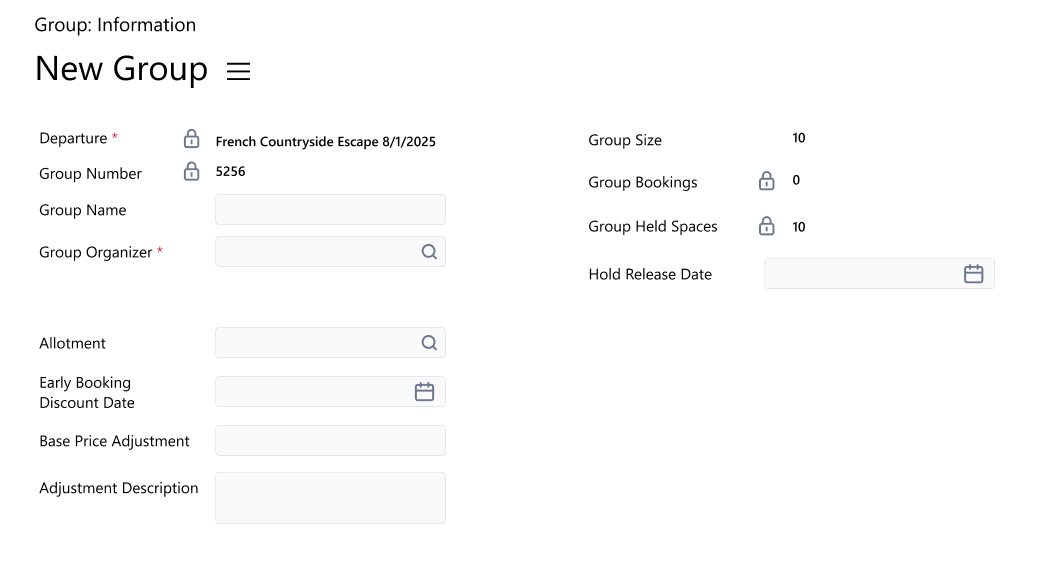
Previously, there was no direct way to link contractual room allotments to a specific traveling group. Additionally, users could define both a manual Group Size and an Allotment on the same record, leading to inventory tracking conflicts. The Group form also lacked a logical layout for these distinct settings.
Resolution
Allotment Lookup: A new Allotment lookup field has been added to the Group entity, filtered to show only allotments associated with the selected Departure.
UI Reorganization: The form is now organized into logical blocks: Departure/Organizer details, Inventory/Size details, and Allotment/Adjustment details.
Validation & Warnings: The system now prevents a Group from using both an Allotment and manual Group Size settings. If a conflict is detected, the save is blocked with a warning: “Cannot save this Group record because it contains both an Allotment and Group Size/Hold Release Date values. Remove either the Allotment or the Group Size and Hold Release Date values before saving.”