
Multiple bug fixes are included in this release relative to Planner 2.0
Budget View
- The Quantity column was displaying "0 rooms" for accommodation costs. This has been fixed.
- The Quantity column was incorrect for accommodation cost having only a double rate. This has been fixed.
Cost
- An accommodation cost having unit = per person was calculating total cost amount incorrectly. This has been fixed.
- An accommodation cost having only a double rate was resulting in an incorrect calculation for number of units which caused an incorrect total cost amount. This has been fixed.
- When creating a manual accommodation cost, an incorrect guest count was added. Applicable when the pricing method = Per Person based on Double and Single Supplement and when the adult guest was an odd number. This has been fixed.
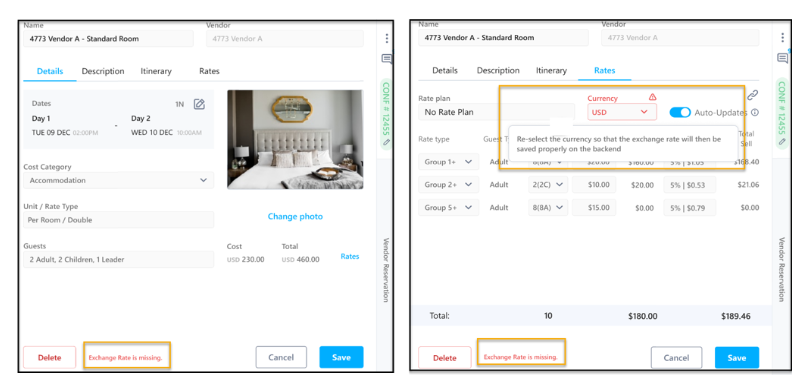
- A cost having no exchange rate would display a white screen when opening the cost or the budget view. This has been fixed. A warning will now display advising of the issue.
Price
- Locking a base price was setting the Price Status Reason = Locked. When a price having max guest set and when max guest was reached, the price became unavailable for new bookings and Price Status Reason = Unavailable. This was causing price to become unlocked affecting header calculations. This has been fixed.
- A new field to store the Lock value has been created.
- Price Status Reason options are now Active or Unavailable.
- For this release, all existing prices having status reason = locked will be updated to Status Reason = Active and Locked = Yes.