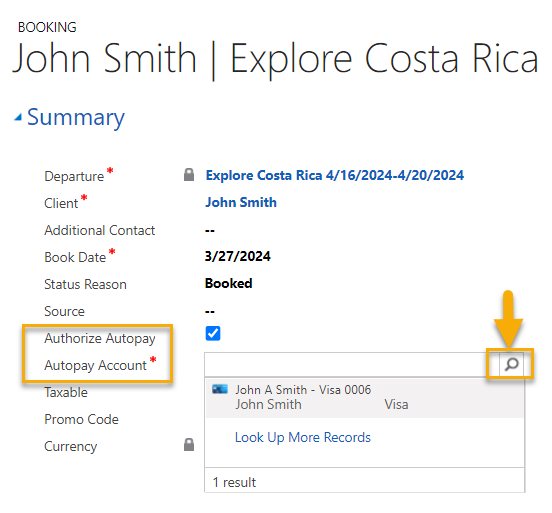
When enabling Autopay, a new Autopay Account field becomes visible. Use this field to select the payment account to be used for the automatic creation of payments.
- Only 1 payment account can be selected.
- When clicking on the search icon, by default, the list of payment accounts associated to the booking client will display. The list is filtered to display only active accounts associated with the active merchant account(s).
- There is no change to the existing logic for when autopay is triggered.
- There is no change to the existing logic for the payment amount of the triggered autopay payment.
If you are not yet using Autopay have your System Administrator contact the Support Team to set this up.
Refer to Online Help for more information.
https://supportweb.peak15systems.com/Bookings/More_Information_Bookings/Autopay.htm
NOTE: For all existing booking that have Autopay enabled, we will set the payment account for you in conjunction with the release based on the following criteria.
- The payment account used on the most recently created payment on the invoice.
- If no payment exists on the invoice, the latest active payment account of the booking client.