
Customer referrals can now be tracked within the system enabling you to create or enhance your referral reward program.
- New customers are able to identify who referred them on the Customer website and that information is then passed into and stored in the crm.
- Internal users are able to link an existing Contact to a new Contact as a Referred By.
- The rules:
- A contact cannot refer itself.
- A contact cannot refer another contact having the same primary address
- A contact who has been referred cannot reciprocate the referral.
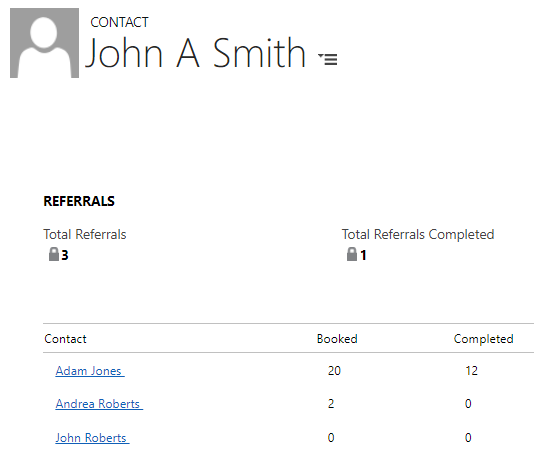
In the above example, John A Smith has referred 3 contacts, 2 have booked but only 1 has completed a booking.
- Total Referrals = a count of all Contacts referred.
- Total Referrals Completed = a count of referred Contacts who have completed at least 1 booking.
- Booked = a count of records where guest status = Booked + Completed.
- Completed = a count of records where guest status = Completed.
If wanting to capture a referral as part of an inquiry or a booking using Beacon, your web forms would use a contact search to find the contact that is being listed as the referrer and then pass that contact's GUID into the contact.p15_referredbyID field.
Refer to Online Help for more information.
https://supportweb.peak15systems.com/Records_Management/Contacts/Referrals.htm
Have your System Administrator contact the Support Team for more information on how to incorporate this information into workflows, reports, etc.